

HouseKeeper
2019
For my module Human-Computer Interaction, my group was given the task of creating and designing an application. We were free to decide on whatever topic we desired, so we decided to focus on accommodation as our chosen topic. Our goal was to make sharing a house with others an easy and enjoyable experience. After brainstorming with our original theme, we narrowed down an app idea that allowed people living together to organise house duties and handle bills in one place. We concluded from interviews with testers, mainly students but also those living at home and one or two working professionals, that sharing a house was not easy and demanded cooperation and organisation. We worked on features that would facilitate housemates to live in contentment, particularly those with differing schedules. The outcome led to requirements that would assist in assigning chores, planning bills and upcoming payments and keeping others in the home updated on events or changes around the home
Research
First step involved examining the problem space, finding our potential requirements and our stakeholders
Problem Space Points
-
Disorganisation in the household leads to feuds and disagreements
-
Inability to make decisions as a group.
-
There can be a lack of communication.
-
Lack of privacy/personal space in the household.
-
Running a house is expensive and sometimes difficult
Overview of Potential Requirements
-
To provide an easier way to keep track of when bills are due
-
To create a much easier communication system between all the housemates, landlords etc
This system includes a way:
-
To create a communal bullet-in board homepage for housemates to leave general messages for the whole house
-
To provide an easier way of communication between the landlord and all the housemates
-
To share issues/problems visually and easily by being able to take and share pictures
-
To have reminders for general housing schedules such as bins & recycling
-
To simplify delegating housework between housemates
-
To supply local information related to house repairs and general upkeep
User Types Stakeholders
Tenants - These are the target users for our potential application.
Developments - They will work on the upkeep of the applications
Landlord - Landlord can input the application to communicate with tenants if needed
Service Workers - We intend that workers such as plumbers and electricians would be connected with the application by the landlord
Parents - This can also be used in a family setting
Student - Most likely our main users of the application
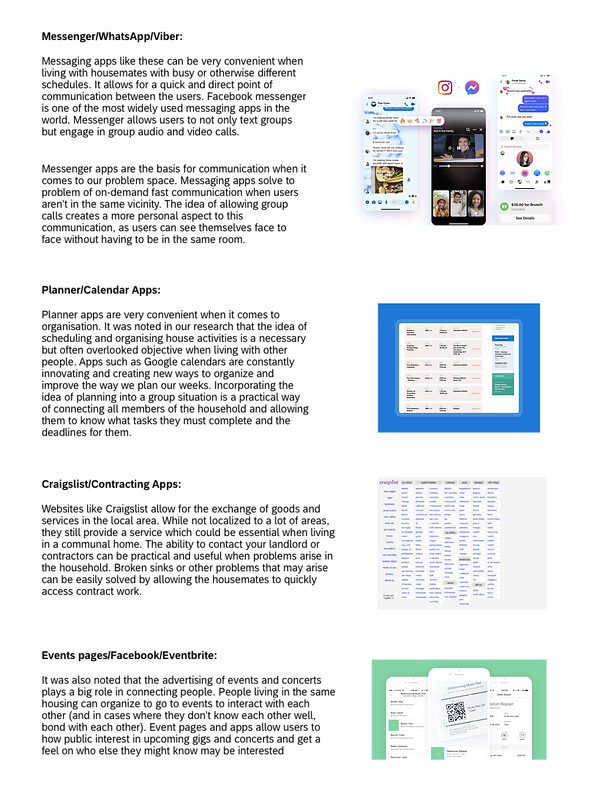
Secondary Research involved looking at what was already available and could be considered helpful for our stakeholders.
Understanding Users & Design Requirements
After conducting our secondary research, we moved onto the interview stage of our design. Our main findings we found include:
Understanding the User
-
The majority live in college accommodation
-
Mostly living with friends
-
Communication is relatively okay.
Challenging Assumptions
-
Generally enjoy living with others
-
Communicating delegation of work can be difficult
-
The mentality that each person believes they’re right about issues.
Behaviour
-
Difficulty solving simple issues because of social reasons
-
No one wants the “parent” title
-
Theirs unspoken atmosphere when conflict
-
Conflict is generally avoided
Interest
-
General interest in the app.
-
Uncertainty whether people would bother using it.
-
Interest would be gained if there was a way to get everyone to cooperate.
-
More interest from people living in student accommodation than at home.
As our application is targeted towards people living in rental accommodation we wanted to make our users as versatile as possible when creating personas. We then used these personas to aid us to learn more about our stakeholders moving forward.

To conclude this stage, we created storyboards to illustrate scenarios when the app could potentially be used.

Design Requirements to Paper Prototyping
The most important thing for us moving forward when designing our app is not to lose focus of the main functionality. Behind all the bells and whistles we want to design an app that can fulfill the users needs and provide a good user experience. To achieve this we narrowed down the main elements of what we want the app to achieve into different headings.
Core Functionality
-
Chores - to delegate work among housemates
-
Events - to organise plans among the house easily
-
Payment - to simplify paying rent + all house utilities
-
Home Screen - where recent and important information can be quickly read
-
General - Such as reminders, notifications etc
Secondary Functionality
-
Login and Register - to create an account or signing into the app. This may be done through Google and Facebook also.
-
Settings - logging out and changing users settings.

Next step involved sketching ideas on how we would like our features to be displayed.
After comparing ideas, we came up with the final low fidelity wireframe. This adapted all our ideas as a group. We also decided to name the app HouseKeeper.

High Fidelity Prototype
Finally, we were able to move onto the final step of our project and that was to create our high fidelity prototype. We created and designed this prototype through Figma where a clickable prototype is avaliable.

The image below links to the clickable prototype:
